

1. Bring your material together
Get everything onto one board.
Notes, images, video, links, PDFs, and documents sit side by side. Write why each one is there, and the board remembers for you.


Example board

An AI-powered visual canvas
Put notes, images, links, and files on one board, and think the project through with your team and AI that sees all of it. Plan a product, a campaign, a film, or a research paper.
Start free in your browser. No credit card required.
Ideas develop through rough notes, references, questions, and unexpected connections. Most tools are built to organize what you already know. Grein gives you room to explore while the idea is still taking shape.
Fixed structures
Documents and lists work well once you know how your thoughts fit together.
An open canvas
Explore, rearrange, compare, and connect ideas while you’re still working them out.
1. Bring your material together
Notes, images, video, links, PDFs, and documents sit side by side. Write why each one is there, and the board remembers for you.
2. Explore and connect ideas
Move things around until a shape appears. Group what belongs together, draw arrows between related ideas, and give a big topic its own nested board.
3. Work with AI in context
Brainstorm with Dia, an AI assistant that reads what’s on your canvas, helps you explore ideas and organize your thinking, and can make the changes on the board for you.
4. Keep developing it, together
Invite your team to edit live, leave comments on the exact block they’re about, and come back to the board as the project moves forward.
AI in Grein
Instead of describing your project from scratch in a separate chat, use the board as the context. Dia, Grein’s built-in AI for brainstorming, is on every plan, and so is connecting your own AI.
Dia reads the notes, links, files, and images on the board you have open, so you can ask how they connect without pasting anything into a chat.
How Dia worksAsk for alternatives, open questions, or next steps, and Dia can make the changes on the board. Peek, in beta, suggests one while you work.
See the AI canvasConnect Claude, ChatGPT, Gemini, or Perplexity over MCP. They can read your boards and add to them, with the access you grant, on your own subscription.
Connect over MCP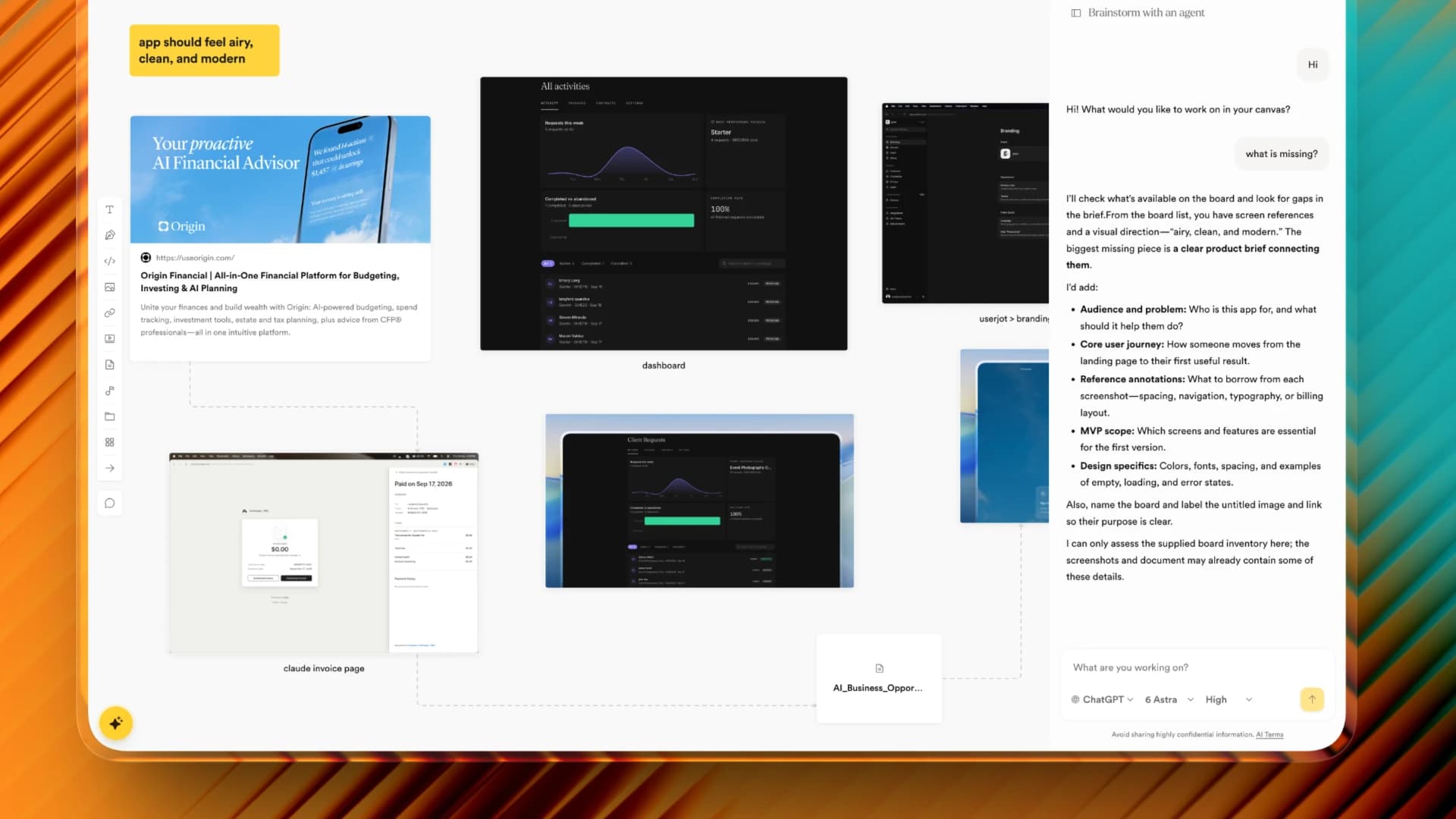
The desktop app (beta) puts your own Claude or ChatGPT next to the board. Get the desktop beta.
Put the business model, the roadmap, and the product on one board that your team and your AI can both read.
See how they use itKeep the brief, the creative, and the content calendar on one board, with feedback on the work itself.
See how they use itPut images, color, and typography on one board so clients can agree on a direction before production.
See how they use itBring readings, research, and your own thinking together. Build an argument you can see.
See how they use itMap the concepts, lessons, and resources for a unit on one board, then share it with students or colleagues.
See how they use itGather the fragments, find the thread, and give your story a structure you can move around.
See how they use itAll-time totals from Grein’s own records.
What early users say, in their own words. Read more.
“It's easy to use. I can organize ideas and create neat moodboards.”
 Anonymous Grein userMoodboards, references & brainstorming
“Helps me plan and cooperate better. Love the look, feel and price.”
 Anonymous Grein userBrainstorming
“I can access my stuff almost everywhere. Almost like Figma.”
 Anonymous Grein userMoodboards & brainstorming
Start with a free workspace and build your first board.
Create a free workspace and add your first board.
Start free without adding payment details. Upgrade when you need more room. Compare plans in detail.
Something else? Ask us.
Grein is a visual canvas for thinking through and developing projects, like planning a product, a campaign, a film, or a research paper. Put your notes, references, drafts, and files on one board, work on it with your team, and ask AI that can see the whole board for help along the way.
Anyone working an idea into a project: product teams and founders, marketers, designers and other creatives, writers, students, researchers, and teachers. If your thinking starts messy and gets clearer as you go, a canvas suits it.
Yes, to start, with no credit card. The free plan includes 2 projects, unlimited blocks, uploads up to 25 MB, 5 days of version history, public sharing, and AI brainstorming with Dia, up to 100 messages a month. Pro adds unlimited projects, larger uploads, full history, and unlimited messages with Dia.
Dia, Grein's built-in AI for brainstorming, reads the board you have open, answers questions about it, suggests ideas, and can make the changes on the board for you. It can also read a link or document when your question needs it. Free accounts get 100 messages a month; Pro has no cap. Grein doesn't use your content to train its own models.
Yes, on any plan. Connect Claude, ChatGPT, Gemini, or Perplexity over MCP and they can read your boards and add to them with the access you grant. The desktop app, in beta, also works with your own Claude or ChatGPT account. Their usage runs on your own subscription.
Text, links, images, video, audio, PDFs, documents, code, and sketches. Paste links, drag in files, and organize your work with nested boards.
Yes. Invite people as editors or viewers to work on the same board live, comment on blocks, and talk in project chat. To just show someone, share a public view link; they don't need an account to open it.
Create a free account with Google or your email, make a project, and start from a template or a blank board. Add what you already have, then bring people or AI in when it helps.
Yes. Your projects are private to you and the people you share them with, unless you make one public, and everything in them is encrypted.
Your boards are stored encrypted on Grein's servers in Germany and files with Cloudflare in Western Europe. A connected AI app can reach the projects your account can reach, with the read or write access you grant, and you can disconnect it in Settings → Connections. You can download or delete your data at any time.
Yes. Grein Desktop is available in beta. The download button opens our Telegram community, where you can get the beta download and share feedback.
Give it room to develop. Use Grein to think it through, explore it, and build on it.