

The whiteboard for ideas that start messy.


Throw your notes, photos, links, files and voice memos on one board. Move them around until the idea makes sense.
Free to start. No credit card.




Used by individuals and teams at
Thinking is messy, but most tools want it tidy. Grein gives the mess somewhere to go, so you can move it around until the idea takes shape.








Bring the pieces together and organize
- Notes and text
- Images and screenshots
- Documents and PDFs
- Links and web references
- Videos and audio
- Voice memos
A canvas for the way you think.
Find the direction before you make the design. Gather visual references, explore colors and typography, and bring your ideas together until the direction feels right.
Templates
A good place to start.
Start with a board built for the work you want to do, then make it your own.
Bring together visual references, colors, typography and creative direction.
For designers
Use templateOrganize shot ideas, location references, lighting inspiration and production notes.
For photographers
Use templateCollect sources, notes, questions and supporting material in one visual workspace.
For students
Use templateMap characters, scenes, plot points and research while keeping the whole story in view.
For writers
Use templateEverything else
Everything you need to keep thinking.
Find inspiration without leaving the board
Search for photos, videos, sound effects and music from inside Grein. Bring the references you need straight onto your canvas.
AI that works with your ideas
Ask Dia to explore what’s on your board, suggest what might be missing, or organize your content. It works with the context you’ve already gathered.
Work through ideas together
Invite collaborators to work on a board with you. See edits as they happen, leave feedback on individual blocks, and discuss the project in context.
Save anything you find online
Save a page, a link, an image or a quote from any site to the board you choose, without leaving the tab.
Let Claude and ChatGPT organize your Grein boards.
Connect Grein to any AI assistant that supports MCP so it can read your boards, group notes, add content and make changes with the access you grant. Use your own assistant subscription.
- Claude
- ChatGPT
- Gemini
- Perplexity
Work on your Grein boards and chat with AI in one desktop app.
Open your boards in a dedicated desktop window with your own Claude or ChatGPT alongside the canvas. The desktop app is in beta, on every plan.
Get the beta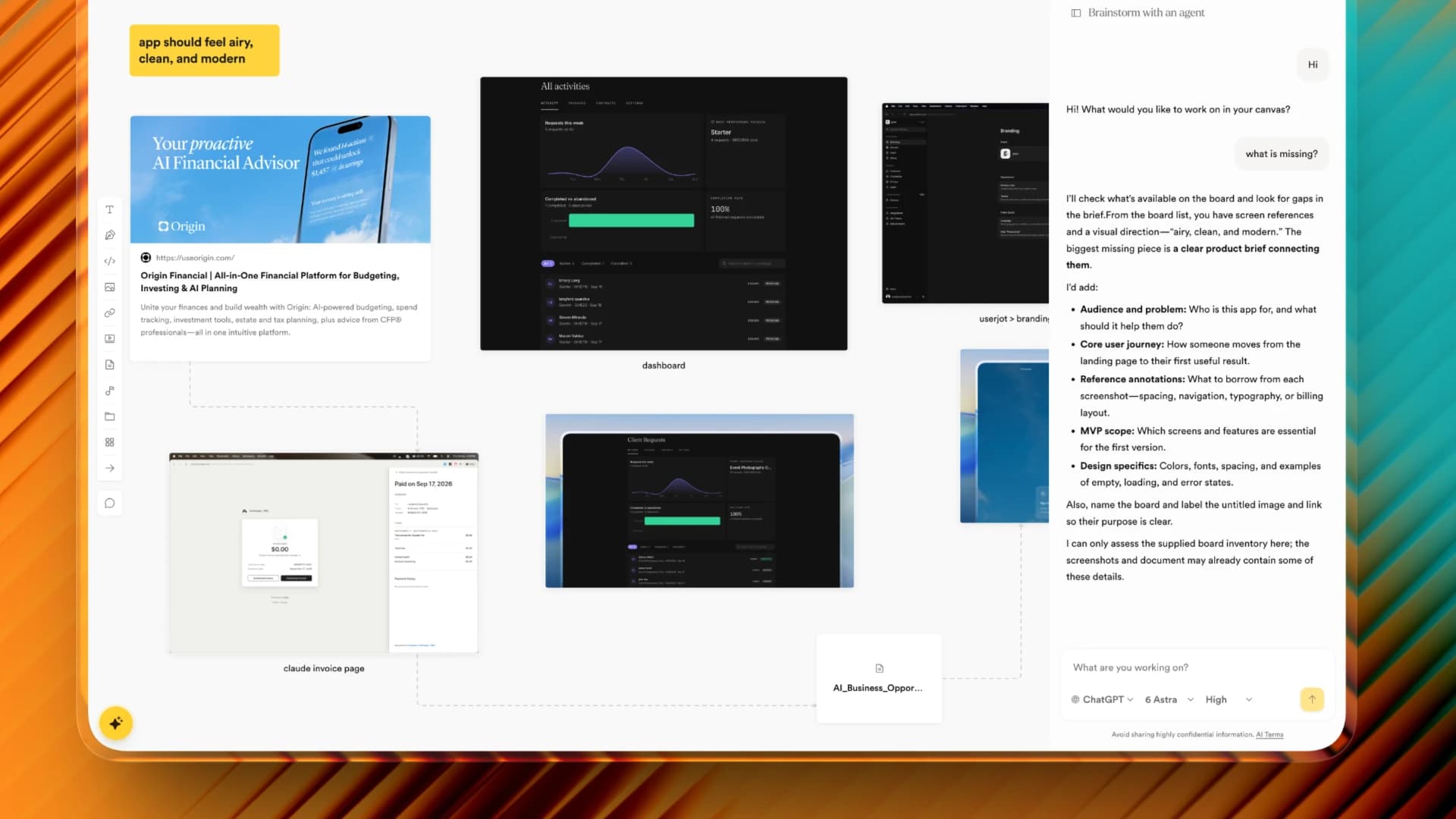
Reviews
Pinned up by people who use it
“It's easy to use. I can organize ideas and create neat moodboards.”
Grein user · moodboards, references & brainstorming
“Helps me plan and cooperate better. Love the look, feel and price.”
Grein user · brainstorming
“I can access my stuff almost everywhere. Almost like Figma.”
Grein user · moodboards & brainstorming
Grein is an infinite whiteboard canvas for thinking through ideas and projects. Bring notes, images, links, files and voice memos onto one board, move them around until the idea makes sense, and use AI when it helps.
People who think visually and work through ideas, including designers, photographers, students and writers.
Yes, to start, with no credit card. The free plan includes 2 projects, unlimited canvas blocks, uploads up to 25 MB, 5 days of version history, public sharing, and 100 AI requests a month for Dia and Peek, Grein’s built-in AI. Pro adds unlimited projects, larger uploads, full history and unlimited AI.
Text, links, images, video, audio, PDFs and other documents, code, sketches and long-form pages. Paste links, drag in files, and put boards inside boards when a cluster gets big.
Yes. Invite people as editors or viewers to work on the same board live, comment on blocks, and talk in project chat. To just show someone, share a public view link; they don’t need an account to open it.
Yes. On any plan, connect Claude, ChatGPT or another MCP client, such as Gemini or Perplexity, and it can read your boards and add to them with the access you grant. That doesn’t use your AI requests. The desktop app, in beta, also lets you use your own Claude or ChatGPT right beside the board.
Yes. Your projects are private to you and the people you share them with, unless you make one public, and their contents are encrypted where they’re stored. Grein doesn’t use your content to train its own models or turn on training at the AI providers it uses.
Bring the mess. We’ll make room.
Start with what you already have. Sort it out on the board.